Installing the Cosigner
Regular mode on Linux with Docker. Nitro Enclave support is coming soon.
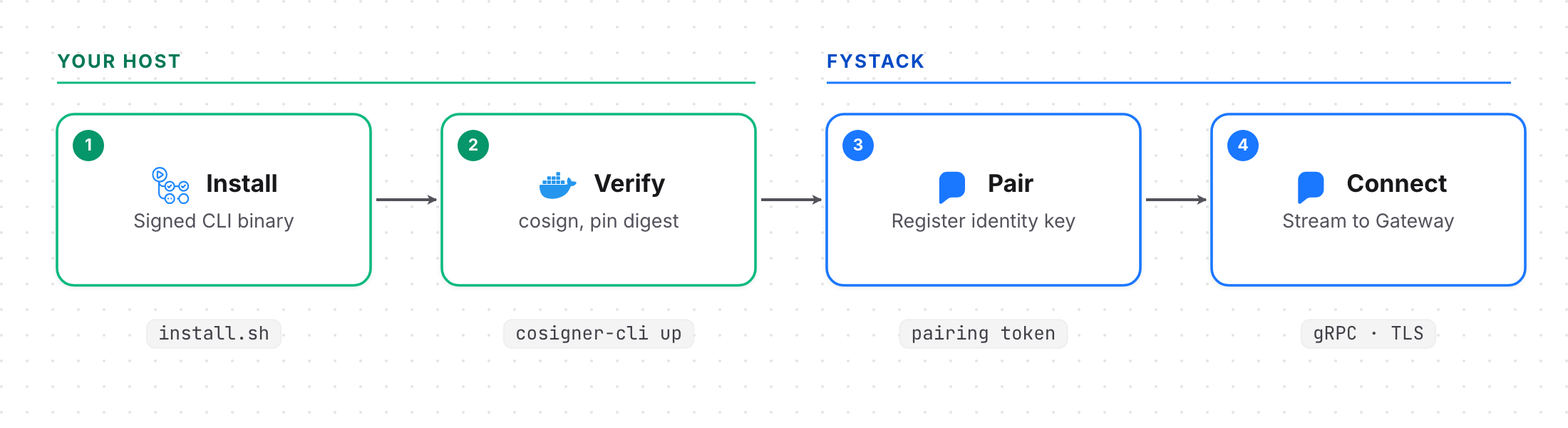
Prerequisites
- Host: Linux
amd64orarm64for production. macOS or WSL 2 for development. - Docker: Engine 20.10+ with Compose v2.
- cosign: v3+. The installer adds it if missing.
- From Fystack: a pairing token (
cps_...) and your Apex endpoint. - Callback server: required for production. See Approval Callback.
Network: no inbound ports. Outbound HTTPS to Apex, the Fystack Gateway, ghcr.io, your callback and (unattended profile) AWS KMS.
Step 1: Install cosigner-cli
curl -sSL https://cosigner.fystack.io/install.sh | sh
Checks the binary's SHA-256 and Sigstore signature, then installs to /usr/local/bin (or ~/.local/bin).
| Option | Env var | Effect |
|---|---|---|
--version vX.Y.Z |
COSIGNER_VERSION |
Install a specific release |
--dir DIR |
COSIGNER_INSTALL_DIR |
Install location |
--skip-docker-check | Skip Docker checks |
To verify the installer before running it, see Supply chain verification.
Step 2: Create the instance directory
export COSIGNER_HOME=/srv/cosigner
mkdir -p $COSIGNER_HOME/secrets && chmod 700 $COSIGNER_HOME/secrets
Step 3: Write the config
Pick a profile:
manual(default): storage key wrapped with a password. Enter it on every start. No auto-restart.unattended: storage key wrapped by your AWS KMS key. Starts on boot.
Keep the file outside the instance directory; up copies it in.
config.yaml
storage:
  backend: sqlite
  sqlite:
    path: data/cosigner.db
  encryption:
    kek:
      type: password_envelope
      config:
        path: /run/secrets/storage-kek.enc
approval:
  require_callback: true
audit:
  type: file
  config:
    path: /var/lib/cosigner/audit.jsonl
callback:
  url: https://YOUR-CALLBACK-HOST/cosigner/approve
  timeout: 30s
  retry_count: 1
  private_key:
    type: file
    config:
      path: /run/secrets/cosigner-private.der.hex
  response_public_key_path: /run/secrets/server-public.pem
/var/lib/cosignermaps to$COSIGNER_HOME/state;/run/secretsmaps to$COSIGNER_HOME/secrets(read-only).- Unattended: encrypt a random 32-byte key with your KMS key, save the base64 ciphertext as
secrets/storage-kek.kms. The container needskms:Decryptvia an IAM role. - Callback keys: place them in
secrets/(mode600), or runcosigner-cli callback addafter setup.
Without --config, up writes a dev-only default with require_callback: false. Always pass a config in production.
Step 4: Check the host
cosigner-cli doctor
Checks Docker, cosign and config. Reports unconfigured, configured but unpaired or paired.
Step 5: Pair and start
cosigner-cli up \
  --apex-endpoint https://YOUR-APEX-HOST \
  --config /secure/config.yaml
Add --profile unattended for KMS. up then:
- Verifies the newest
ghcr.io/fystack/cosignerrelease with cosign and pins its digest, before asking for any secret. - Prompts for the storage password (manual) and pairing token. Use
--token-fileto pass the token non-interactively. - Pairs: generates an Ed25519 identity, registers it with Apex, saves
state/pairing.yaml. - Starts the container, unlocks it and connects to the Gateway.
Pin a release with --image ghcr.io/fystack/cosigner@sha256:.... Digests are on cosigner.fystack.io.
Step 6: Verify
cosigner-cli status
cosigner-cli info
cosigner-cli logs -f
Once status shows ready, the cosigner is online and can join keygen.
Instance layout
| Path | Contents |
|---|---|
cosigner-cli.yaml |
Apex endpoint, pinned image digest, profile |
config.yaml |
Runtime config (read-only) |
docker-compose.yaml |
Generated, hardened Compose file |
secrets/ |
Wrapped storage key and callback keys |
state/pairing.yaml |
Pairing record from Apex |
state/cosigner.key |
Ed25519 identity key |
state/data/cosigner.db |
Encrypted key shares and session state |
state/audit.jsonl |
Signed audit log |
Run on boot
Unattended profile only. Adapt the bundled systemd unit:
/etc/systemd/system/cosigner.service
[Unit]
Description=Fystack Cosigner (KMS unattended profile)
Requires=docker.service
After=docker.service network-online.target
Wants=network-online.target

[Service]
Type=oneshot
RemainAfterExit=yes
User=cosigner
Group=cosigner
SupplementaryGroups=docker
ExecStart=/usr/local/bin/cosigner-cli --home /var/lib/fystack-cosigner start
ExecStop=/usr/local/bin/cosigner-cli --home /var/lib/fystack-cosigner stop
TimeoutStartSec=360
TimeoutStopSec=60
UMask=0077

[Install]
WantedBy=multi-user.target
For the manual profile, pass the password through a file descriptor:
COSIGNER_PASSWORD_FD=3 cosigner-cli start 3< /run/secrets/cosigner-pw
Troubleshooting
| Symptom | Fix |
|---|---|
| Image signature verification failed | Don't bypass. Check the image reference and contact security@fystack.io. |
| identity already registered | Restore the original pairing data from backup instead of re-pairing. |
| Exits right after start | Startup callback ping failed. Check the callback is reachable and trusts cosigner-public.pem. |
| AlreadyExists | Another instance with this identity is connected. Stop it. |
| PermissionDenied | Cosigner was revoked. It will not reconnect. |
| Not ready after first start | Generating ECDSA pre-parameters. Wait up to 5 minutes. |