Policies
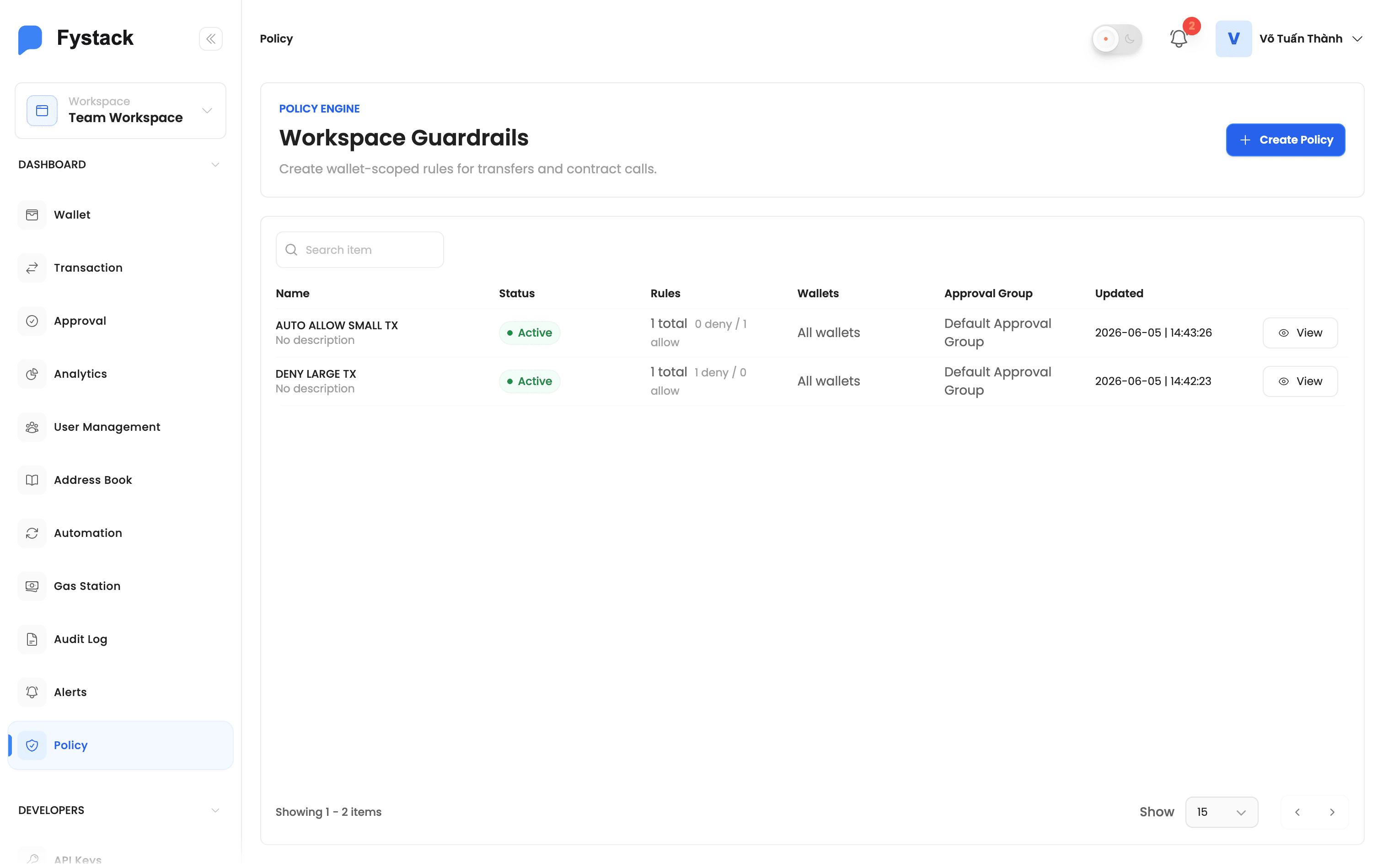
Set programmable guardrails that automatically allow, block, or route sensitive actions through normal approval in your workspace. Policies evaluate every withdrawal and smart contract call against rules you define, so risky activity is stopped before it ever reaches the blockchain.
Overview
A policy is a set of rules that runs automatically whenever someone initiates a guarded action, such as requesting a withdrawal or calling a smart contract. Each rule describes a condition (for example, "withdrawal value over $10,000 to a non-whitelisted address") and an effect:
- Deny: block the action outright
- Allow: let the action skip the approval queue and proceed directly
Policies act as an always-on layer of defense that complements your signer approvals. Instead of relying on every approver to remember your treasury rules, you encode those rules once and let Fystack enforce them on every transaction.
How Policies Are Evaluated
When a guarded action runs, Fystack checks it against every active policy that targets the relevant wallet and applies a custody-safe decision model:
- Deny always wins: if any rule matches with a Deny effect, the action is blocked, even if another rule would allow it.
- Allow bypasses approval: if a rule matches with an Allow effect and nothing denies, the action skips the approval queue and proceeds.
- No match: if no rule matches, the action continues through your normal approval flow.
Policy evaluation is fail-closed. If a policy cannot be evaluated for any reason, the action is denied rather than allowed through. This guarantees a misconfiguration or system issue can never silently weaken your controls.
Trigger Actions
Each rule applies to one trigger action, the type of operation it guards:
Trigger | Guards |
|---|---|
Withdrawal | Evaluated when a withdrawal is requested. Rules can reference the amount, USD value, asset, destination address, whitelist status, address age, and recent wallet, workspace, and network activity. |
Contract Call | Evaluated when a smart contract method is called. Rules can reference the network, contract address, method selector, method name, native value, gas limit, and decoded call arguments. |
How to Create a Policy
Step 1: Open the Policies Page
In the left sidebar, open Policies, then click Create Policy.
Step 2: Name the Policy and Choose an Approval Group
Give the policy a clear Name that describes what it protects (for example, "Large withdrawal guard"). Then select the Approval Group that will review changes to this policy.
Every policy is tied to an approval group. This means a policy cannot be silently created or edited, any change must be reviewed and approved, the same way a withdrawal is.
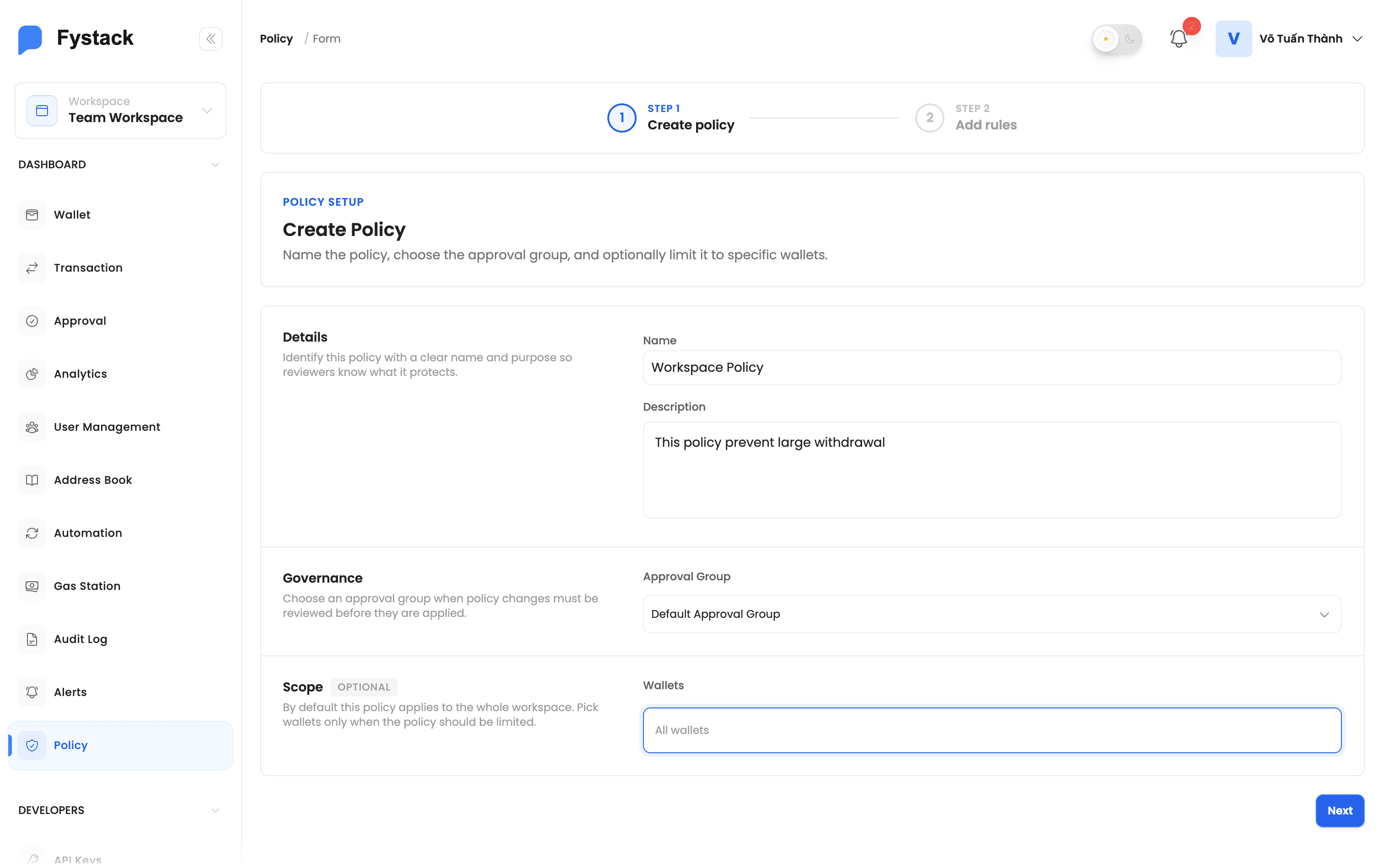
The approval group is preselected with your workspace's default. You can change it to any group whose members should be responsible for reviewing this policy's rules.
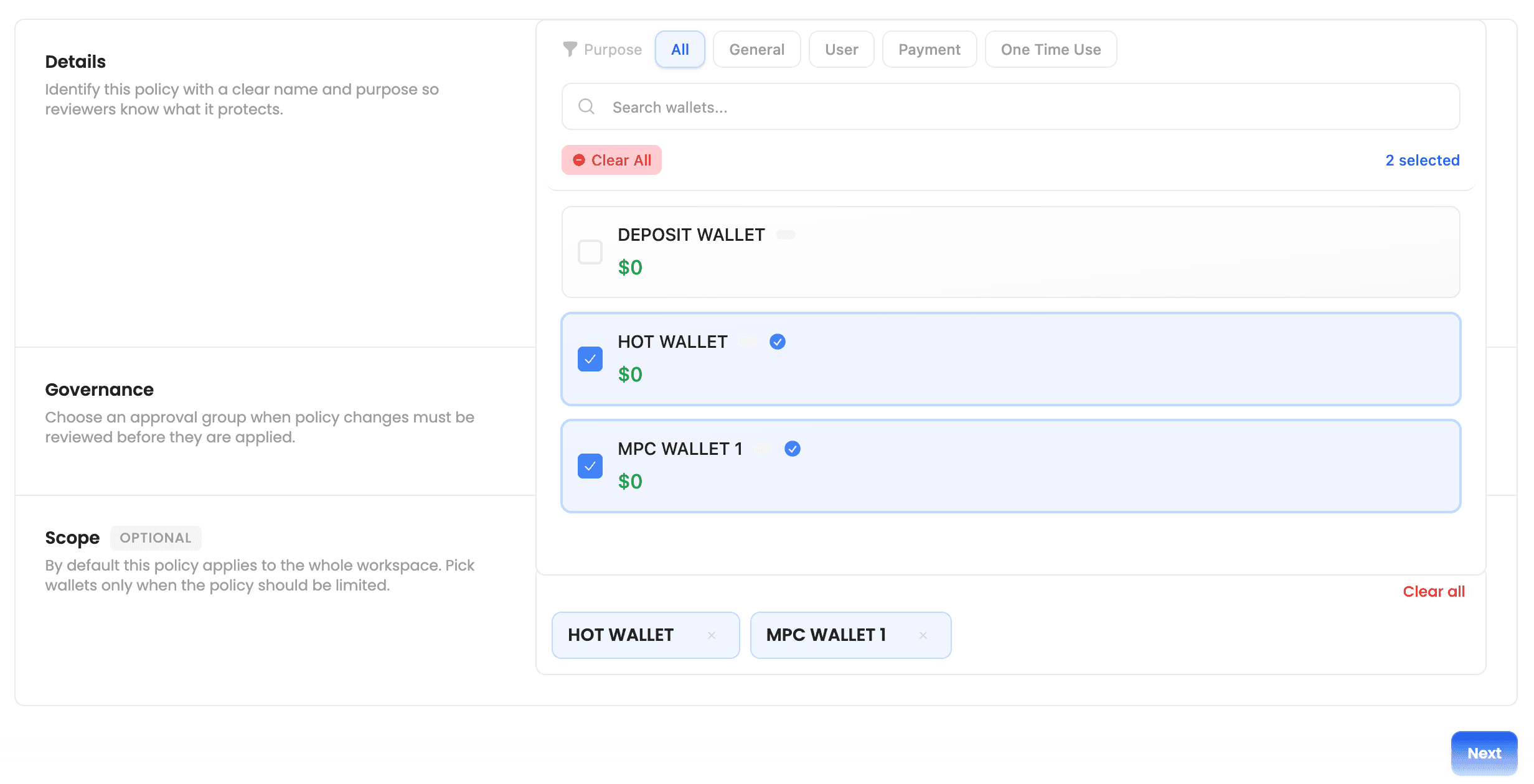
Step 3: Target Specific Wallets (Optional)
By default, a policy applies to all wallets in the workspace. To scope it to a subset, select one or more wallets in the Wallets field. The policy's rules will only be evaluated for actions on those wallets.
Step 4: Add Rules
Add one or more rules to the policy. For each rule, choose the Trigger (Withdrawal or Contract Call), build the Condition, and pick the Effect (Allow or Deny).
The condition builder shows the fields available for the selected trigger, so you can construct expressions without memorizing field names. See Writing Rule Conditions below for examples.
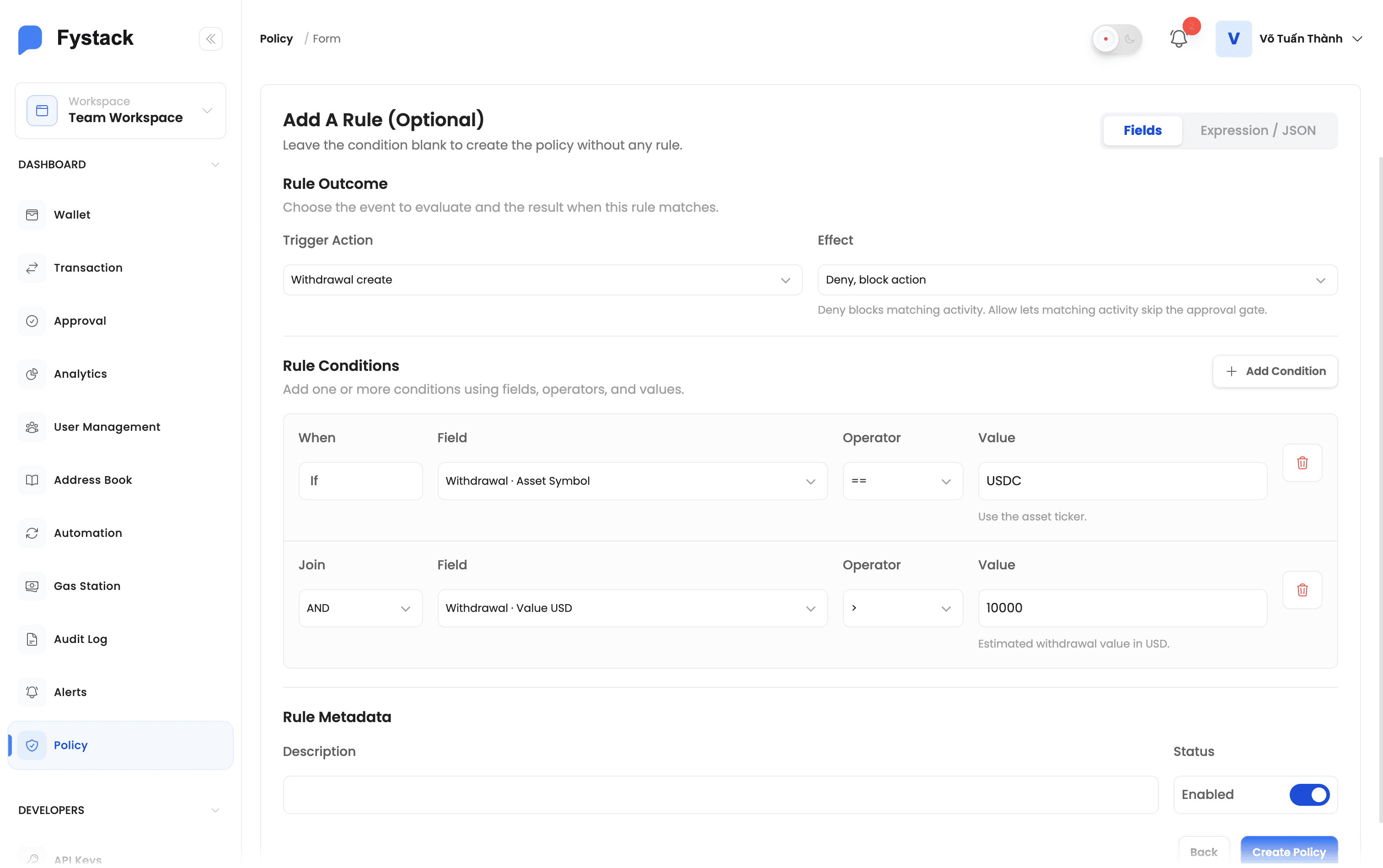
Policies also programmable with JSON builder, which is useful for power users who want to copy/paste rules or use more complex logic than the UI supports.
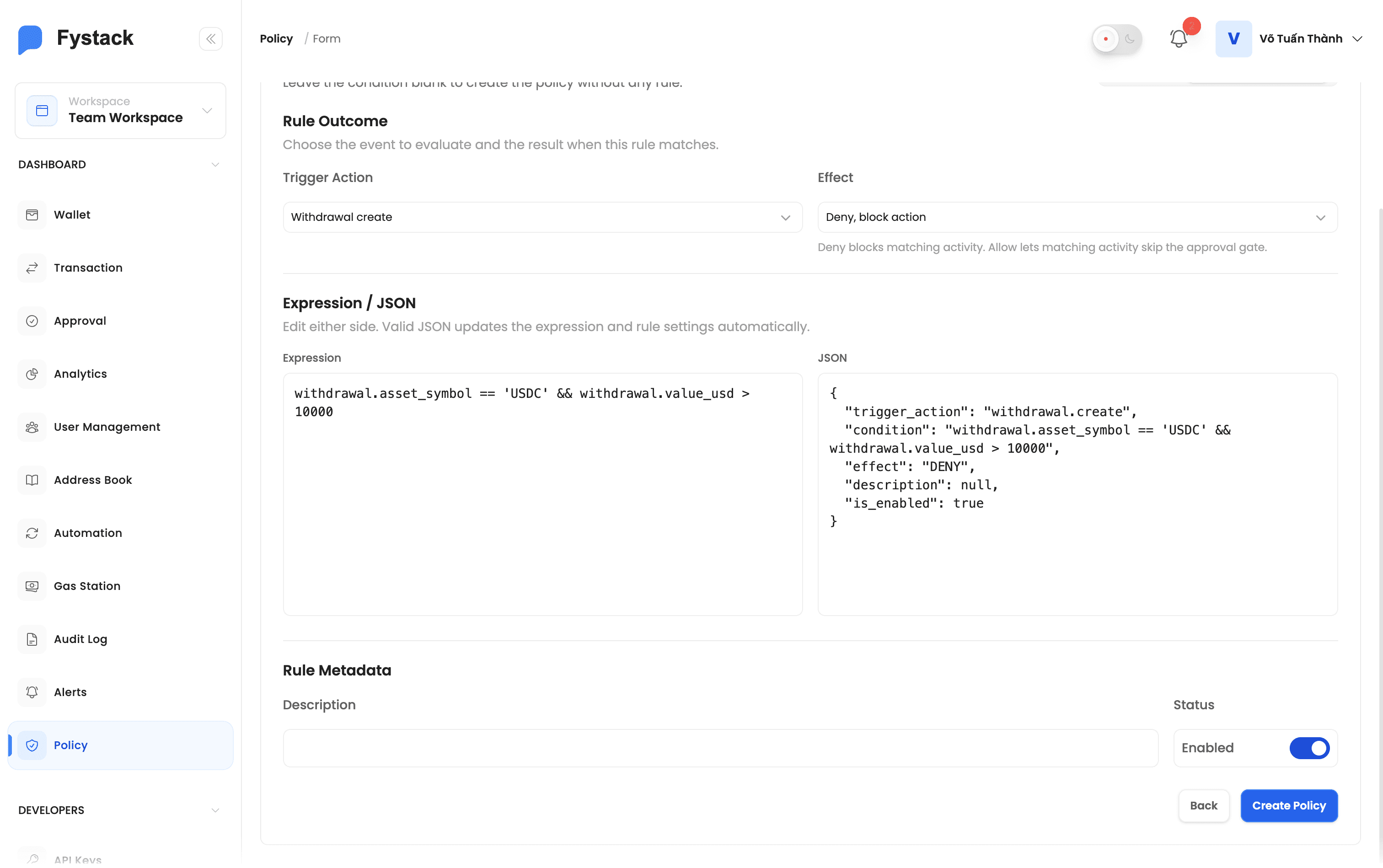
Step 5: Submit for Approval
Click Create. Because every policy is approval-gated, the new policy is not active yet, it is submitted to its approval group as a Pending Approval request, along with all of its rules.
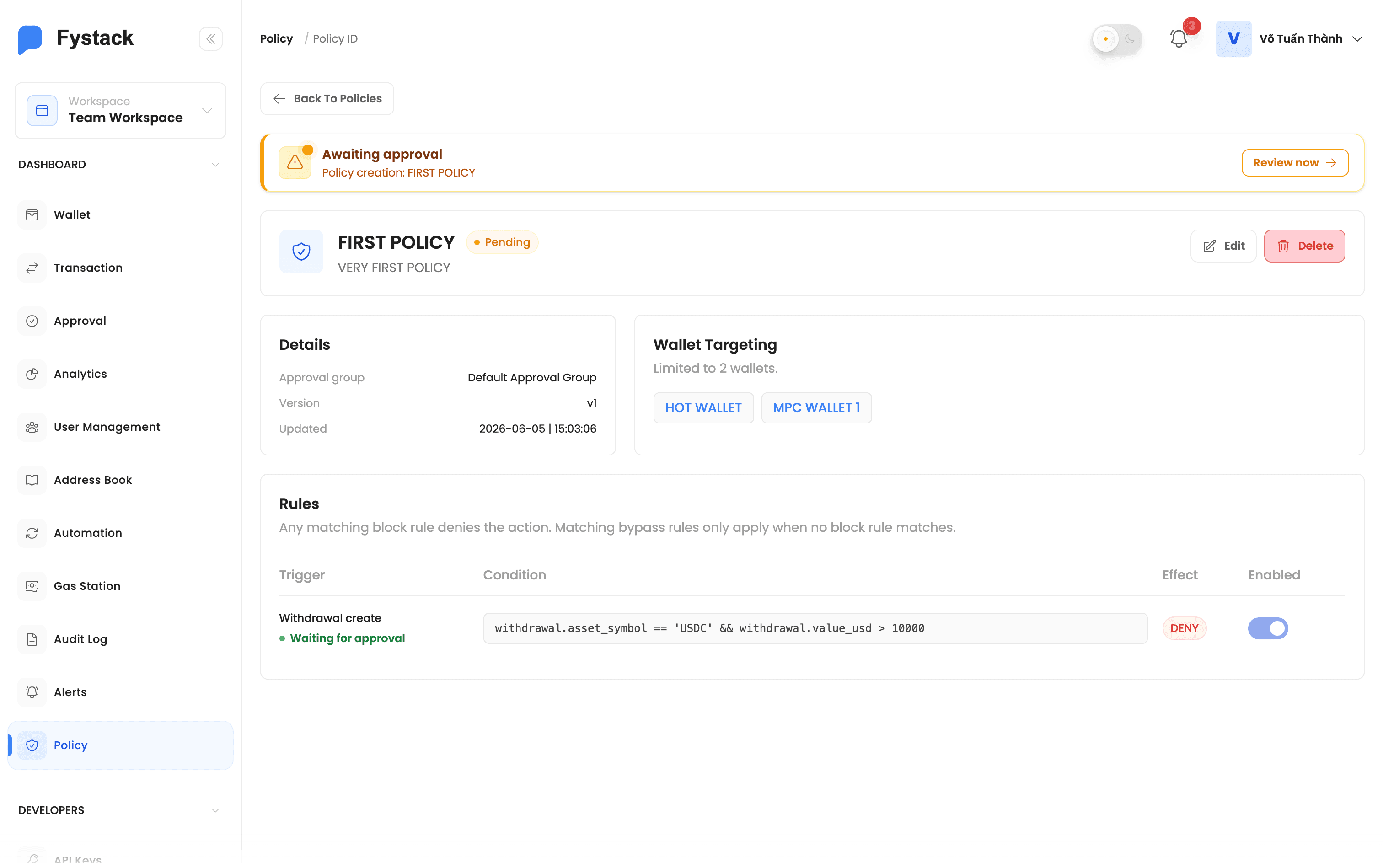
Step 6: Approve the Policy
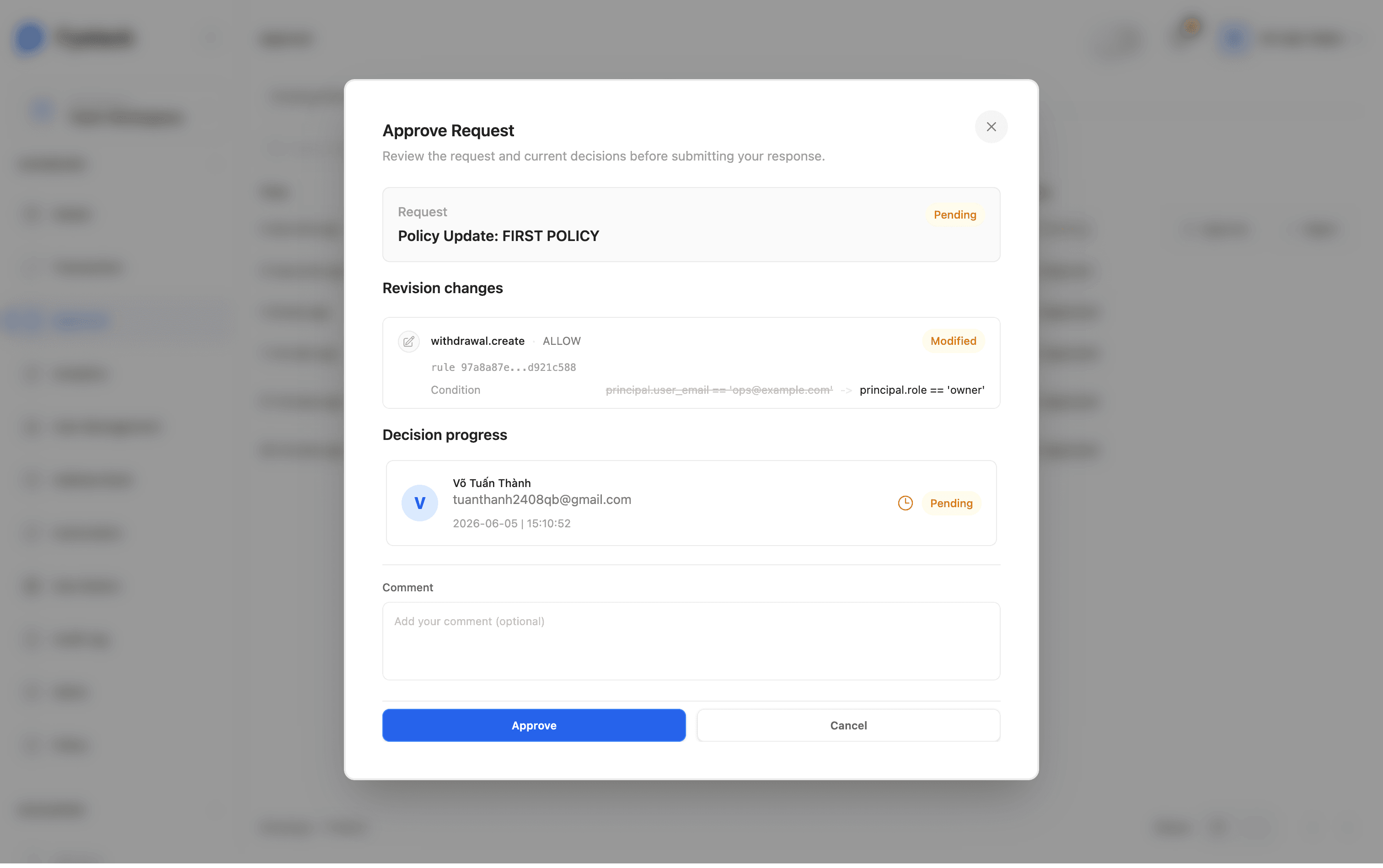
A member of the assigned approval group opens the pending request, reviews the proposed policy and its rules, and approves it. Only then does the policy become Active and start guarding transactions.
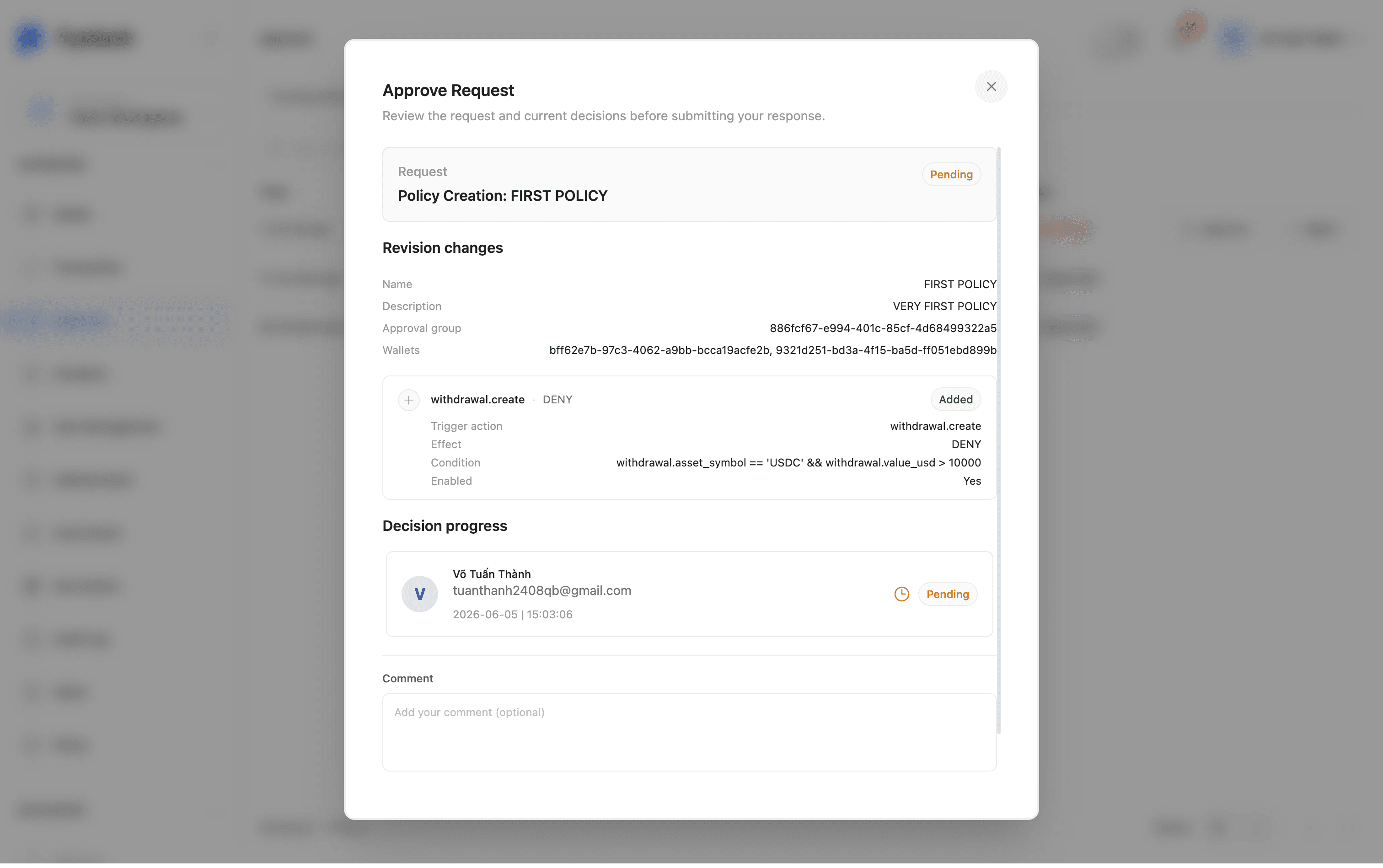
The same approval flow applies to later policy and rule changes: editing a rule, adding a rule, or deleting the policy creates a new approval request. Nothing takes effect until the group signs off.
Writing Rule Conditions
A condition is an expression that evaluates to true or false. When it is true, the rule's effect applies. Combine fields with and, or, and not, and compare values with operators like >, >=, ==, and !=.
Condition Fields
The fields available in the builder depend on the rule's trigger. Use the labels below when deciding which field belongs in a rule.
Available on Every Trigger
Field | Use it for |
|---|---|
User email | Rules that apply to a specific initiator. |
User role | Rules based on workspace role: owner, admin, signer, proposer, viewer, or guest. |
Hour | Time-of-day controls using UTC hour from 0 to 23. |
Day of week | Business-hour, weekend, or weekday-only rules. |
Withdrawal Fields
Field | Use it for |
|---|---|
Amount | Asset-denominated limits, such as more than 10 ETH or 1 BTC. |
Value USD | Dollar-denominated limits across assets. |
Asset symbol | Asset-specific rules for symbols such as USDT, ETH, BTC, or SOL. |
Native asset | Different controls for native network assets versus tokens. |
Destination address | Blocking or allowing specific recipient addresses. |
Network code | Network-specific limits, such as stricter rules on one chain. |
Whitelisted address | Controls for recipients that are or are not in the address book. |
Address age | Cooling-off rules for newly added address book records. |
Withdrawal Activity Fields
Field | Use it for |
|---|---|
Wallet outflow | Per-wallet USD outflow over the last 1, 6, or 24 hours. |
Wallet withdrawal count | Burst controls for many withdrawals from one wallet in the last hour. |
Workspace outflow | Workspace-wide USD outflow over the last 1, 6, or 24 hours. |
Workspace withdrawal count | Workspace-wide withdrawal volume in the last hour. |
Network outflow | Workspace USD outflow on the selected network over the last 1, 6, or 24 hours. |
Network withdrawal count | Workspace withdrawal volume on the selected network in the last hour. |
Activity fields are calculated from realized withdrawals. They count funds after a withdrawal has been executed or confirmed, not merely proposed.
Contract Call Fields
Field | Use it for |
|---|---|
Network code | Chain-specific contract call rules. |
Contract address | Blocking unknown contracts or allowing known contracts. |
Method selector | Low-level function checks, such as ERC-20 transfer selector
|
Method name | Human-readable method checks when metadata is available. |
Value wei | Native value sent with a contract call. |
Gas limit | Blocking unusually expensive or risky calls. |
Decoded arguments | Argument-level rules when Fystack can decode the call. ERC-20 transfers expose recipient and token value. |
Decoded arguments are only available when the call can be decoded. In the JSON builder, guard decoded argument checks before reading a value.
Example Conditions
Goal | Effect | Condition |
|---|---|---|
Block large transfers to unknown addresses | Deny | value over $10,000 and address not whitelisted |
Auto-approve small transfers to trusted addresses | Allow | value under $100 and address whitelisted |
Throttle wallets making many withdrawals quickly | Deny | more than 10 withdrawals in the last hour |
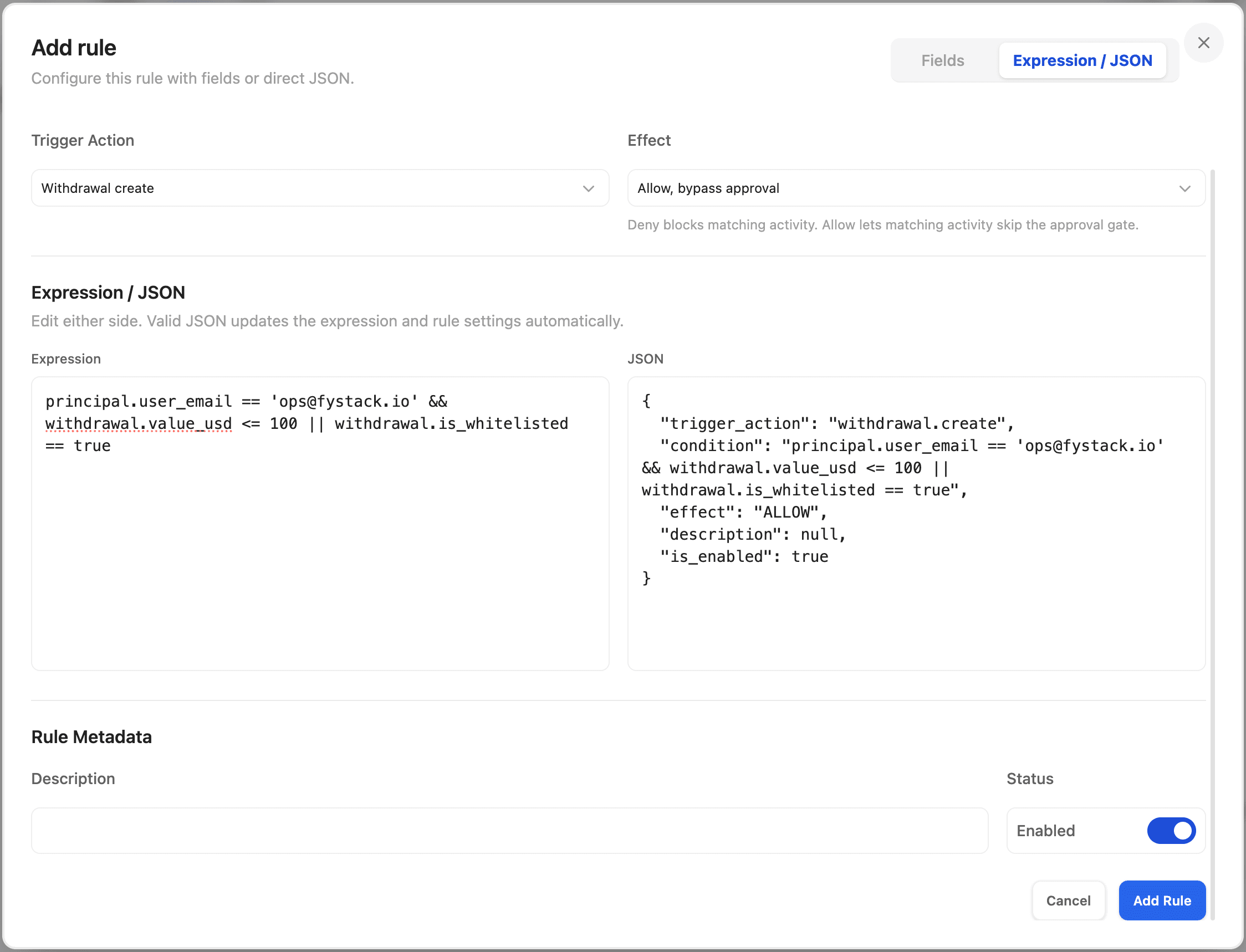
You can validate a condition before saving it. The builder checks the expression against the trigger's available fields and flags any errors, so you never submit a rule that cannot run.
Policy Statuses
Status | Meaning |
|---|---|
Pending | The policy, or a change to it, is awaiting sign-off from its approval group. It is not yet enforced. |
Active | The policy is approved and live. Its rules are evaluated against every guarded action on the targeted wallets. |
Inactive | The policy is disabled and not evaluated. |
Rejected | A pending change was rejected by an approver and did not take effect. |
Change History
Every change to a policy is recorded. The policy's History shows each revision with who proposed it, what changed (field by field), and whether it was approved or rejected. This gives you a complete audit trail of how your guardrails evolved over time.
Best Practices
- Start with Deny rules for your highest-risk scenarios (large transfers, unknown destinations) before adding convenience Allow rules
- Remember that Deny always wins, use this to set hard limits that no Allow rule can override
- Scope policies to specific wallets when different wallets have different risk profiles, rather than applying one broad policy everywhere
- Use Allow rules sparingly, they bypass your approval queue, so reserve them for low-value, clearly trusted patterns
- Validate every condition before submitting, and review the change in the approval step to confirm it behaves as intended
- Treat policy changes with the same care as withdrawals, the approval gate exists so no single person can weaken your controls unnoticed